Your AI agents,
one click away.
Launch, organize, and track your AI terminal agents from a beautiful native macOS app. Stop typing the same commands — start building.

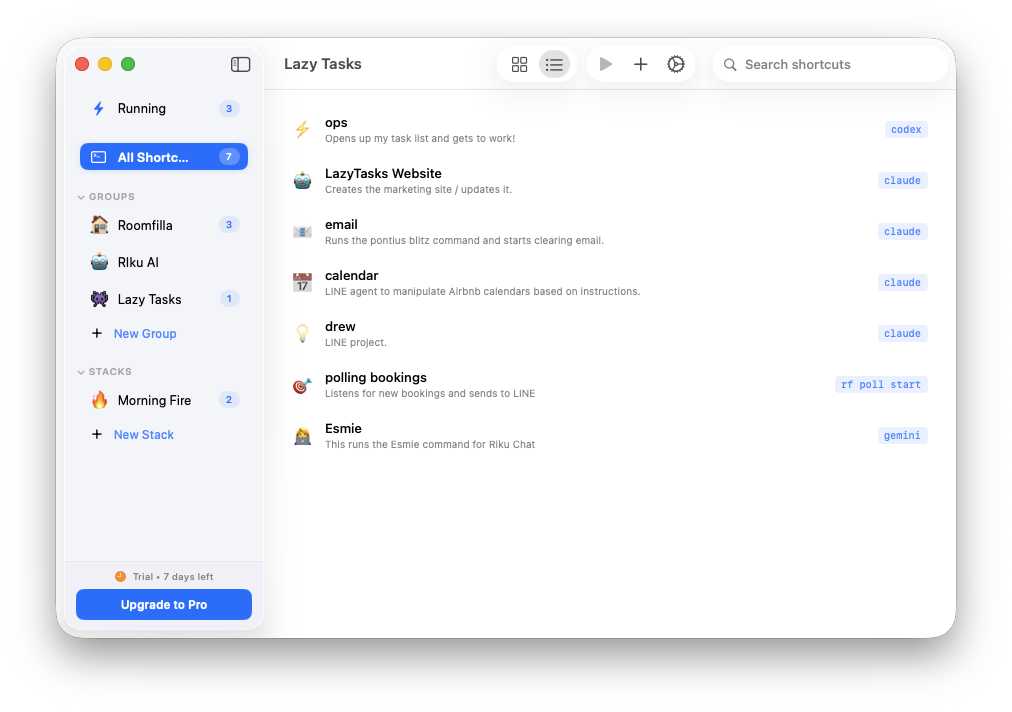
Why Lazy Tasks
The command line,
without the commands
One-Click Launch
Define your directory, command, and prompt once. Launch any AI agent with a single click from the app or menu bar.
Live Agent Tracking
See which agents are running, read their output, and respond to prompts — all without switching to Terminal.
Beautiful & Native
Built with SwiftUI for macOS. Glassmorphism cards, expressive animations, and 8 hand-crafted themes.
See it in action
Launch. Track. Ship.
One click launches your agent. Lazy Tasks watches it run and lets you respond to prompts — all without touching the terminal.
Features
Everything you need
Built for developers who live in the terminal.
Shortcuts
Save your most-used agent commands as shortcuts. Each one stores a directory, command, and optional initial prompt.
Groups
Organize shortcuts into project groups. Drag and drop to rearrange.
Stacks
Launch multiple agents at once with configurable delays between each.
Live Tracking
Monitor running agents in real-time. See status, output, and respond to prompts.
Menu Bar
Quick-launch any shortcut from the menu bar without opening the full app.
Shell Aliases
Auto-sync shortcuts as shell aliases. Type the alias name in any terminal to launch.
Themes
8 hand-crafted themes with light and dark mode support. Midnight, Ocean, Neon, and more.
Auto-Updates
Sparkle-powered auto-updates. Get new features and fixes without lifting a finger.
Compatibility
Works with every CLI agent
Lazy Tasks launches commands in your terminal. If it runs in a shell, it works with Lazy Tasks.
One-time purchase
$19
One-time purchase. No subscriptions.
- Unlimited shortcuts
- Groups & Stacks
- Live agent tracking
- Prompt detection & response
- Menu bar quick launch
- Shell alias sync
Stop typing.
Start building.
Launch your AI agents with one click. Try it free for 7 days.